
Large language models are impressive, but they have two big limits: they do not know your private documents, and they sometimes make things up. A RAG chatbot solves both. Retrieval-augmented generation (RAG) lets a chatbot search your own files, such as policies, product manuals, course notes or research papers, and answer questions using only what it finds, with sources.
In this tutorial you will build a working RAG chatbot using Python and LangChain, step by step. You will load PDFs, split them into chunks, turn the chunks into embeddings, store them in a Chroma vector database, retrieve the most relevant passages for each question, and generate grounded answers with a large language model. Finally, you will add a simple chat interface with Streamlit and learn how to make the chatbot more accurate.
Key takeaways
- RAG has two stages: index your documents once, then retrieve relevant chunks and generate an answer for every question.
- The core stack is Python, LangChain, an embedding model, a vector database such as Chroma, and an LLM.
- RAG is usually cheaper and easier to keep up to date than fine-tuning when your goal is answering questions from documents.
- Most accuracy gains come from better chunking, retrieval and evaluation, not from switching to a bigger model.
Table of contents
- What is RAG? (in simple terms)
- Why RAG matters: latest stats
- RAG chatbot architecture
- RAG vs fine-tuning
- Prerequisites and setup
- Step 1: Load your documents
- Step 2: Split documents into chunks
- Step 3: Create embeddings and store them in Chroma
- Step 4: Retrieve context and generate answers
- Step 5: Add a chat interface with Streamlit
- Going further: agentic RAG with LangChain
- How to make your RAG chatbot more accurate
- Deploying your chatbot
- Common mistakes
- RAG chatbot project ideas
- Frequently asked questions
What is RAG? (in simple terms)
Retrieval-augmented generation is a technique that gives a large language model the right information at the moment it answers. Think of it as an open-book exam. Instead of answering from memory, the model first looks up the relevant pages in your documents, then writes an answer based on those pages.
Without RAG, an LLM can only use what it learned during training. It does not know your company’s leave policy, last month’s product update or the notes from your course, and when it does not know, it may guess. With RAG, the chatbot:
- answers from your private or recent documents,
- can cite the source of each answer, so users can check it,
- stays up to date when you add new documents, without retraining any model,
- and can be told to say “I don’t know” when the answer is not in the documents.
Typical RAG chatbots include HR policy assistants, customer support bots trained on help-centre articles, legal and compliance search tools, college FAQ bots and research assistants for long reports. If you are new to these terms, our guide to AI vs machine learning vs deep learning explains where LLMs fit.
Why RAG matters: latest stats
Businesses are adopting generative AI quickly, and RAG is one of the most common ways they connect it to their own data. These figures show the momentum:
| Statistic | Source |
|---|---|
| 78% of organisations reported using AI in 2024, up from 55% the year before | Stanford HAI, AI Index Report 2025 |
| Generative AI attracted $33.9 billion in private investment globally in 2024, an 18.7% increase from 2023 | Stanford HAI, AI Index Report 2025 |
| The cost of running a model performing at GPT-3.5 level dropped over 280-fold between November 2022 and October 2024 | Stanford HAI, AI Index Report 2025 |
| Contributions to generative AI projects on GitHub grew 59% in 2024, and the number of generative AI projects grew 98% | GitHub Octoverse 2024 |
| Python overtook JavaScript as the most popular language on GitHub in 2024 | GitHub Octoverse 2024 |
| Python’s adoption rose 7 percentage points from 2024 to 2025, as the go-to language for AI | Stack Overflow Developer Survey 2025 |
The sharp fall in model running costs is especially important for RAG. A chatbot that answers thousands of questions a day over company documents is now affordable for small businesses, colleges and individual developers, not just large enterprises.
RAG chatbot architecture
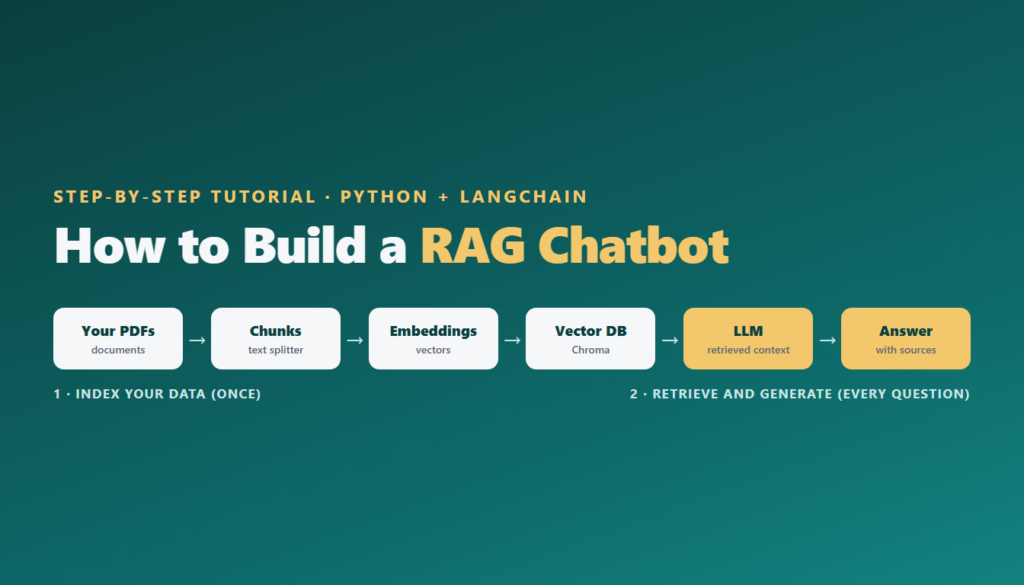
Every RAG chatbot has two pipelines:
1. Indexing (done once, and again when documents change):
- Load documents such as PDFs, web pages or text files.
- Split them into smaller chunks, because LLMs and search work best on focused passages.
- Embed each chunk: an embedding model turns text into a list of numbers that captures its meaning.
- Store the embeddings in a vector database so similar meanings can be found quickly.
2. Retrieval and generation (for every question):
- Embed the user’s question with the same embedding model.
- Retrieve the chunks whose embeddings are most similar to the question.
- Generate an answer: send the question plus the retrieved chunks to the LLM, with instructions to answer only from that context.
RAG vs fine-tuning
A common question is whether to use RAG or fine-tune a model on your data. They solve different problems:
| Aspect | RAG | Fine-tuning |
|---|---|---|
| Best for | Answering questions from documents and knowledge bases | Changing style, format or behaviour on a specific task |
| Keeping knowledge current | Easy: add or update documents | Hard: retrain when facts change |
| Citing sources | Yes, it can show which chunk it used | No, knowledge is baked into the weights |
| Cost and effort | Lower; no model training needed | Higher; needs training data and compute |
| Risk of made-up answers | Lower when properly instructed and evaluated | Can still hallucinate facts |
For most document Q&A chatbots, start with RAG. Consider fine-tuning later, and only for specific behaviours that prompting cannot achieve. The two can also be combined.
Prerequisites and setup
You need basic Python skills (functions, lists, dictionaries and installing packages). If you are still learning, follow our Python for AI roadmap first. You also need Python 3.10 or newer and an API key for an LLM provider.
Create a project folder with a docs subfolder containing a few PDFs you want to chat with, then create a virtual environment and install the packages:
python -m venv rag-env
# Windows: rag-env\Scripts\activate
# macOS / Linux: source rag-env/bin/activate

pip install "langchain[openai]" langchain-text-splitters langchain-huggingface langchain-chroma pypdf streamlit
Set your API key as an environment variable (for OpenAI, OPENAI_API_KEY). Never paste keys directly into your code or commit them to GitHub. In this tutorial the embeddings run locally and free with a Hugging Face Sentence Transformers model, so you only pay for the LLM’s answers. LangChain supports many providers, including Anthropic, Google and local models through Ollama, so you can swap the model with a one-line change.
Step 1: Load your documents
First, read the text from each PDF page and wrap it in a LangChain Document, keeping the file name and page number as metadata. This metadata is what lets your chatbot cite its sources later. Create a file called ingest.py:
from pathlib import Path
from pypdf import PdfReader
from langchain_core.documents import Document

docs = []
for pdf_path in Path("docs").glob("*.pdf"):
    reader = PdfReader(pdf_path)
    for page_number, page in enumerate(reader.pages, start=1):
        text = page.extract_text() or ""
        if text.strip():
            docs.append(Document(
                page_content=text,
                metadata={"source": pdf_path.name, "page": page_number},
            ))

print(f"Loaded {len(docs)} pages")
This works for PDFs that contain real text. Scanned PDFs are images, so they need OCR (optical character recognition) first. LangChain also offers document loaders for web pages, Word files, Notion, Google Drive and many other sources.
Step 2: Split documents into chunks
Whole pages are usually too long and cover several topics, which makes retrieval less precise. Split them into overlapping chunks with LangChain’s RecursiveCharacterTextSplitter, the recommended splitter for general text. It tries to break at paragraphs, then sentences, then words, so chunks stay readable. Add this to ingest.py:
from langchain_text_splitters import RecursiveCharacterTextSplitter

splitter = RecursiveCharacterTextSplitter(chunk_size=1000, chunk_overlap=200)
chunks = splitter.split_documents(docs)

print(f"Split into {len(chunks)} chunks")
The chunk_size is measured in characters. The chunk_overlap repeats a little text between neighbouring chunks so that an idea split across a boundary is not lost. Each chunk keeps the metadata of its page, so you still know where it came from.
Step 3: Create embeddings and store them in Chroma
Next, convert each chunk into an embedding and save it in Chroma, an open-source vector database that runs on your computer and saves its data to a folder. Finish ingest.py with:
from langchain_huggingface import HuggingFaceEmbeddings
from langchain_chroma import Chroma

embeddings = HuggingFaceEmbeddings(
    model_name="sentence-transformers/all-mpnet-base-v2",
    encode_kwargs={"normalize_embeddings": True},
)

vector_store = Chroma(
    collection_name="my_docs",
    embedding_function=embeddings,
    persist_directory="./chroma_db",
)
vector_store.add_documents(chunks)

print("Index saved to ./chroma_db")
Run it once with python ingest.py. The first run downloads the embedding model, which takes a minute. Running the script again adds the chunks a second time, so delete the chroma_db folder before re-indexing changed documents. For larger projects, give each chunk a stable ID so updates replace old entries instead of duplicating them.
Step 4: Retrieve context and generate answers
Now build the question-answering part. Create rag.py. It opens the saved Chroma index, finds the four most relevant chunks for a question with similarity_search, and sends them to the LLM with clear instructions:
from langchain.chat_models import init_chat_model
from langchain_huggingface import HuggingFaceEmbeddings
from langchain_chroma import Chroma

embeddings = HuggingFaceEmbeddings(
    model_name="sentence-transformers/all-mpnet-base-v2",
    encode_kwargs={"normalize_embeddings": True},
)
vector_store = Chroma(
    collection_name="my_docs",
    embedding_function=embeddings,
    persist_directory="./chroma_db",
)

# Use any chat model your provider offers, in "provider:model" format
model = init_chat_model(model="openai:gpt-5.5")

SYSTEM_PROMPT = (
    "You are a helpful assistant that answers questions using only the context provided. "
    "If the answer is not in the context, say you don't know. "
    "Mention the source file and page for each fact you use."
)

def answer(question: str):
    results = vector_store.similarity_search(question, k=4)
    context = "\n\n".join(
        f"[{doc.metadata['source']}, page {doc.metadata['page']}]\n{doc.page_content}"
        for doc in results
    )
    messages = [
        {"role": "system", "content": SYSTEM_PROMPT},
        {"role": "user", "content": f"Context:\n{context}\n\nQuestion: {question}"},
    ]
    response = model.invoke(messages)
    return response.content, results

if __name__ == "__main__":
    reply, sources = answer("What is the leave policy for new employees?")
    print(reply)
Two details matter here. First, you must use the same embedding model for indexing and for questions, or the similarity search will not work. Second, the system prompt tells the model to stay inside the context and admit when it does not know. This single instruction does a lot to reduce made-up answers.
Step 5: Add a chat interface with Streamlit
A command-line script is fine for testing, but a chat window makes your project easy to demo. Streamlit lets you build one in a few lines. Create app.py:
import streamlit as st
from rag import answer

st.title("Chat with your documents")

if "history" not in st.session_state:
    st.session_state.history = []

for role, text in st.session_state.history:
    st.chat_message(role).write(text)

if question := st.chat_input("Ask a question about your PDFs"):
    st.chat_message("user").write(question)
    reply, sources = answer(question)
    st.chat_message("assistant").write(reply)

    with st.expander("Sources"):
        for doc in sources:
            st.write(f"{doc.metadata['source']}, page {doc.metadata['page']}")

    st.session_state.history += [("user", question), ("assistant", reply)]
Run streamlit run app.py and your browser opens a chat window. Ask a question, read the answer, and open “Sources” to check which pages it used. Showing sources builds trust and makes it easy to spot retrieval problems.
Going further: agentic RAG with LangChain
The chatbot above always searches once, then answers. In agentic RAG, the LLM decides when to search, what to search for, and whether it needs to search again, for example to compare two policies or follow up on a detail. Current LangChain makes this straightforward: you turn the search into a tool and give it to an agent.
from langchain.agents import create_agent
from langchain.tools import tool
from rag import vector_store

@tool
def search_documents(query: str) -> str:
    """Search the company documents and return the most relevant passages with sources."""
    results = vector_store.similarity_search(query, k=4)
    return "\n\n".join(
        f"[{d.metadata['source']}, page {d.metadata['page']}]\n{d.page_content}" for d in results
    )

agent = create_agent(model="openai:gpt-5.5", tools=[search_documents])

result = agent.invoke({"messages": [{"role": "user", "content": "Compare the leave policies for interns and full-time staff."}]})
print(result["messages"][-1].content)
The tool’s docstring matters: the agent reads it to decide when to use the tool. Agentic RAG handles complex questions better but costs more per answer and is harder to test, so start with the simple pipeline and move to an agent when you need it. Our Agentic AI course covers agents, tools and multi-step workflows in depth. LangChain’s APIs evolve quickly, so check the official LangChain RAG documentation if anything has changed since this guide was written.
How to make your RAG chatbot more accurate
A first version usually works, but not perfectly. These improvements make the biggest difference, roughly in order of impact:
- Build a test set first. Write 20 to 50 real questions with known answers. Check how many your chatbot gets right before and after each change, so you improve based on evidence rather than impressions.
- Tune chunk size. Smaller chunks (300 to 500 characters) suit precise facts; larger chunks (1,000 to 1,500) suit explanations. Test a few sizes.
- Clean your documents. Remove repeated headers, footers and page numbers that add noise to every chunk.
- Use metadata filters. Tag chunks with department, year or document type, and filter searches so the chatbot looks only in the right place.
- Try hybrid search and re-ranking. Combining keyword search with vector search helps with exact terms such as product codes, and a re-ranking model can reorder retrieved chunks by true relevance.
- Add conversation memory carefully. For follow-up questions like “what about interns?”, rewrite the question using the chat history before searching.
- Check faithfulness. Regularly confirm that answers are supported by the retrieved chunks, not just that they sound right.
Deploying your chatbot
For a portfolio demo, Streamlit Community Cloud can host your app from a GitHub repository, with your API key stored as a secret rather than in code. For production use, wrap the answer function in an API with FastAPI, package it with Docker, move the vector store to a managed or server-based database, and add logging, rate limits and cost monitoring. Also think about access control: a chatbot over private documents must only show each user what they are allowed to see. Our MLOps training covers deployment and monitoring in detail.
Common mistakes
- Using different embedding models for indexing and questions, which breaks retrieval.
- Re-indexing without clearing the old index, which creates duplicate chunks and repeated answers.
- Skipping the “say you don’t know” instruction, which invites confident made-up answers.
- Retrieving too few or too many chunks. Too few misses information; too many adds noise and cost. Start with 4 and test.
- Hard-coding API keys in your code or pushing them to GitHub.
- Judging quality by a few demo questions. Use a proper test set.
RAG chatbot project ideas
Once your first chatbot works, the same code can power many useful projects. Changing the documents changes the product. Here are ideas that make strong portfolio or final-year projects:
- College helpdesk bot: answers student questions from the prospectus, exam rules, fee notices and hostel guidelines, with links to the exact page.
- HR policy assistant: lets employees ask about leave, travel and reimbursement policies instead of searching long PDFs.
- Product support chatbot: answers customer questions from user manuals and help-centre articles, and hands over to a human when it is unsure.
- Study assistant: chats with your own lecture notes and textbooks, and generates practice questions from them.
- Government scheme explainer: answers questions about public schemes from official documents in simple language, ideally in Hindi as well as English.
- Research paper assistant: summarises and compares findings across a folder of papers, citing each one.
For any of these, the extra effort that impresses examiners and employers is the same: real documents, a clean chat interface, visible sources, and a small evaluation showing how often the chatbot answers correctly.
Frequently asked questions
What is a RAG chatbot?
A RAG chatbot uses retrieval-augmented generation: it searches your documents for relevant passages and gives them to a large language model, which writes an answer based on that content, often with sources.
Is LangChain required to build a RAG chatbot?
No. You can build RAG with plain Python and a vector database, or with alternatives such as LlamaIndex. LangChain simply provides ready-made components for loading, splitting, embedding, storing and calling models.
Can I build a RAG chatbot for free?
Mostly. Embeddings can run locally for free with Sentence Transformers, Chroma is open source, and you can run an open-weight LLM locally with Ollama. Paid LLM APIs usually give better answers but cost a small amount per question.
Which vector database is best for beginners?
Chroma is a good starting point because it runs locally with no setup and saves to a folder. For larger production systems, consider server-based or managed vector databases, or PostgreSQL with a vector extension.
What is the difference between RAG and fine-tuning?
RAG gives the model relevant information at question time, so knowledge is easy to update and answers can cite sources. Fine-tuning changes the model’s weights to alter its behaviour or style. For document Q&A, RAG is usually the better first choice.
How do I stop my RAG chatbot from making things up?
Instruct the model to answer only from the context and say when it does not know, show sources, improve retrieval quality, and test answers against a set of questions with known answers.
Is a RAG chatbot a good final-year or portfolio project?
Yes. A RAG chatbot over real documents, with a chat interface, sources and an evaluation of its accuracy, is one of the strongest portfolio projects for AI and machine learning roles today.
Conclusion
You have now built a complete RAG chatbot: it loads PDFs, splits them into chunks, stores embeddings in Chroma, retrieves the most relevant passages, and answers questions with an LLM through a Streamlit chat interface, citing its sources. From here, improve it with a test set, better chunking and hybrid search, or turn it into an agent that can search several times for complex questions.
A RAG chatbot also makes an excellent portfolio piece; see our list of machine learning projects for students and our guide on how to become an AI engineer for what to build next. If you would like to learn RAG, LLMs and agents with a mentor and live projects, explore Gauri AI’s Generative AI course or the AI and Machine Learning course, or talk to a course advisor.